
Today I'm going to show how to make a large DIY wood sign and I have a free printable of the design available below too!
I've been working on my office makeover for what seems like forever! Finally, I'm nearing the end of the process trying to determine my wall art.
I knew I wanted a simple, rustic, wooden sign for above my desk with an inspiring quote that incorporated my calligraphy. Picking the right quote was incredibly difficult for me, especially because I can be so indecisive and I changed my mind at least three times haha!

I decided on the quote "Create the things you wish existed," although I'm not sure of the source of it. I liked this quote because it can relate to all things creative/art/DIY or it can be applied to really any goals in life you wish to achieve!

Note, this post contains some affiliate links. For more info see my disclosures here.
I’m going to show how to make the wood sign and how to transfer the design to the sign. I’m sharing a free printable file and SVG file below of the quote, which features my hand lettering!
(Printables are for personal use only, no commercial use is allowed, thanks!)

There are many ways to apply the design or lettering to your wood sign. I’m going to share two methods here.
One method is with just a pencil and NO vinyl cutting machine or stencil. It's a really easy way how to print on wood. The second method uses a a vinyl cutting machine to make a vinyl stencil, I’ll be using my Cricut. But, you can also make a vinyl stencil with a Silhouette Cameo too.
Also, in this tutorial I am using the Cricut Explore Air 2, but check out my tutorial on how to make a large DIY wood sign with the Cricut Explore 3!
How to make DIY Wood Signs:
Materials:
- "Create the Things you Wish Existed" Printable file (free printable available here)
- ½" thick plywood panel at 2ft x 2ft
- (2) 1x2 @ 8ft
- 1 ¼" brad nails
- Paint for the the sign background (I used White Dove by Benjamin Moore)**
- Paint or spray paint for the lettering**
- Paint rollers
- Stencil brush or marker or paint marker (optional for lettering, see step #4)
- Wood Stain (I used this stain)
- Wood glue
- Cricut, Silhouette Cameo, or other cutting machine (OPTIONAL, see step #4)
Tools:
- Miter Saw (or have your home improvement store make the cuts)
- Brad Nailer or Hammer
- Clamps (optional)
**Paint - For details on painting signs and the best type of paints to use for DIY wood signs, see the best paint for wood signs.
Video Tutorial:
I have a step by step video tutorial for this wood sign on my YouTube channel!
1. Cut wood to size for DIY wooden sign with saying
Using a miter saw, cut your 1x2s to the following sizes (or have your local home improvement store make the cuts for you):
- Two pieces at 24"
- Two pieces at 25 ½"
Note, if you have a custom size sign do two wood pieces cut at the exact length of the top and bottom sides and two at 1 ½" plus the length of the left and right sides.

2. Stain wood sign frame
Stain all sides of your 1x2 frame pieces. For tips on how to stain wood for a beautiful finish, check out my tutorial on how to stain wood.
3. Prime and paint wood sign
Use a paint roller and prime the front side of your 2ft x 2ft plywood piece. Let it dry.

Then, apply the first coat of paint to your sign board. Let dry and then apply a second coat of paint. To learn my favorite methods for painting wood signs and the best kinds of paint to use, see How to Paint DIY Wood Signs.

For this sign, I used Benjamin Moore White Dove in eggshell for my sign background board.
LET THE PAINT DRY AND CURE FOR AT LEAST 24 HOURS!

4. Transfer the design onto the painted DIY wood sign
Time for the lettering! There are many ways to print on wood and transfer a print design to a wood sign. And if you have a favorite way I'd love to hear in the comments!
I'm going to share two methods here, one method with with just a pencil and NO machine or stencil! And a second method with a vinyl stencil using a vinyl cutting machine. I'll be using my Cricut for this example. But, I show how to make a make a vinyl stencil with a Silhouette Cameo here.
Transfer Design Method #1 - Pencil Tracing Method (NO vinyl machine or stencil needed)
If you don't have a vinyl cutting machine, this method uses a pencil to transfer the design to wood. Although it is more time consuming, it's very easy!
A. Get enlarged print of design
Have the free design file printed as an enlarged print at your local copy store. Staples and Fedex Office both offer 24" x 36" engineering or architectural prints for $3-$5.

Then, once you have the enlarged print, use the easy pencil tracing method to print on wood.
B. Flip print over and shade over the design through the back
So, first you flip your large poster print over and shade over the lettering that shows through the back with a pencil. Make sure to place a piece of paper underneath to avoid the ink getting on your work surface.
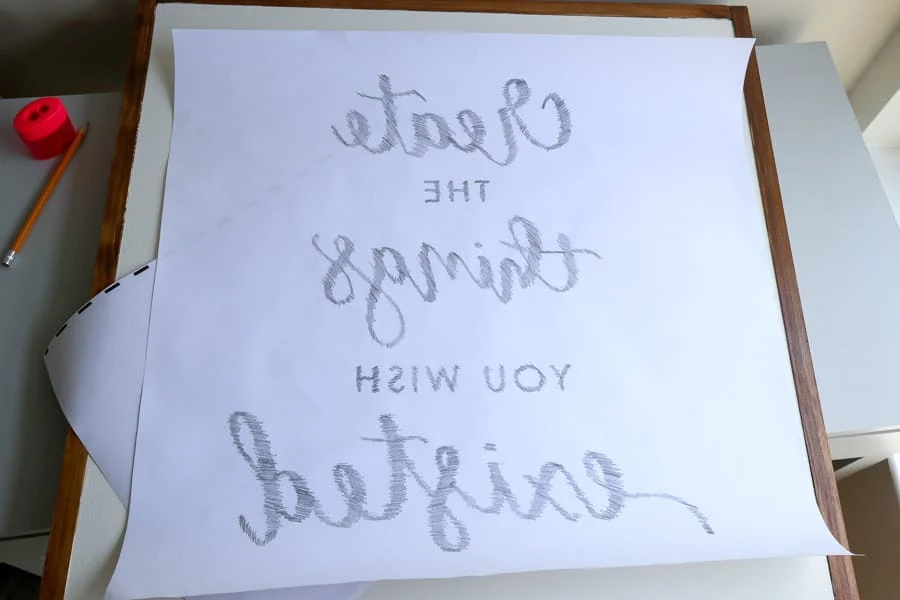
Flip the poster print back over and secure it to your sign with painter's tape or masking tape, centered on the sign.

C. Trace the design outline with a pencil
Trace the lettering outline with a pencil with some pressure.
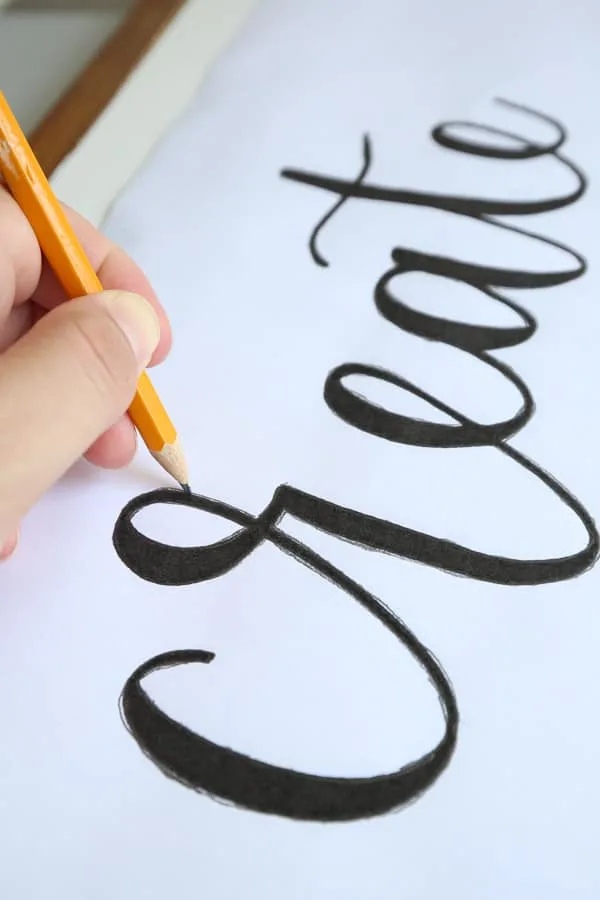
D. Trace the pencil design outline with a marker or paint pen
Proceed with painting in your letters after you have the design outline on your wood. For this method, a paint marker or permanent marker works best for tracing over the pencil lines! You may need a few of them since they tend to dry out fast on these large signs.

***
Transfer Design Method #2 - Vinyl Stencil with a Cricut
A QUICK NOTE ABOUT THE ORIGINAL SIGN:
Before I get into this second method, how to make wooden signs with stencils, using my Cricut, I want to explain how I originally made the sign for the first time.
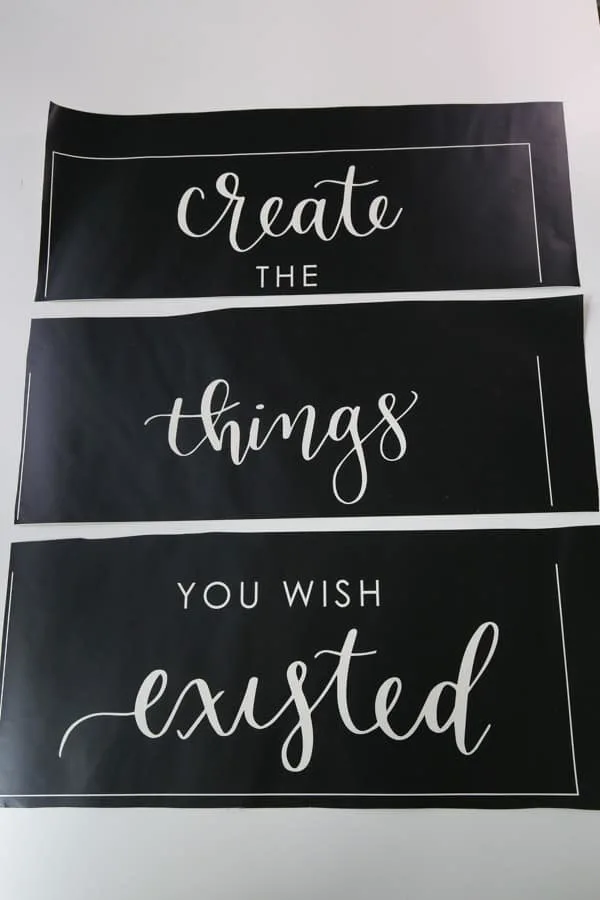
Originally, I printed the design out with my professional vinyl cutting machine (which cuts up to 24" wide) as a vinyl decal and used it as a vinyl stencil on the wood sign (shown in below three photos).
Then, I painted two coats of black acrylic paint with a small, art, paint brush, making sure I didn't put the paint on too heavy to prevent it from seeping under the vinyl.

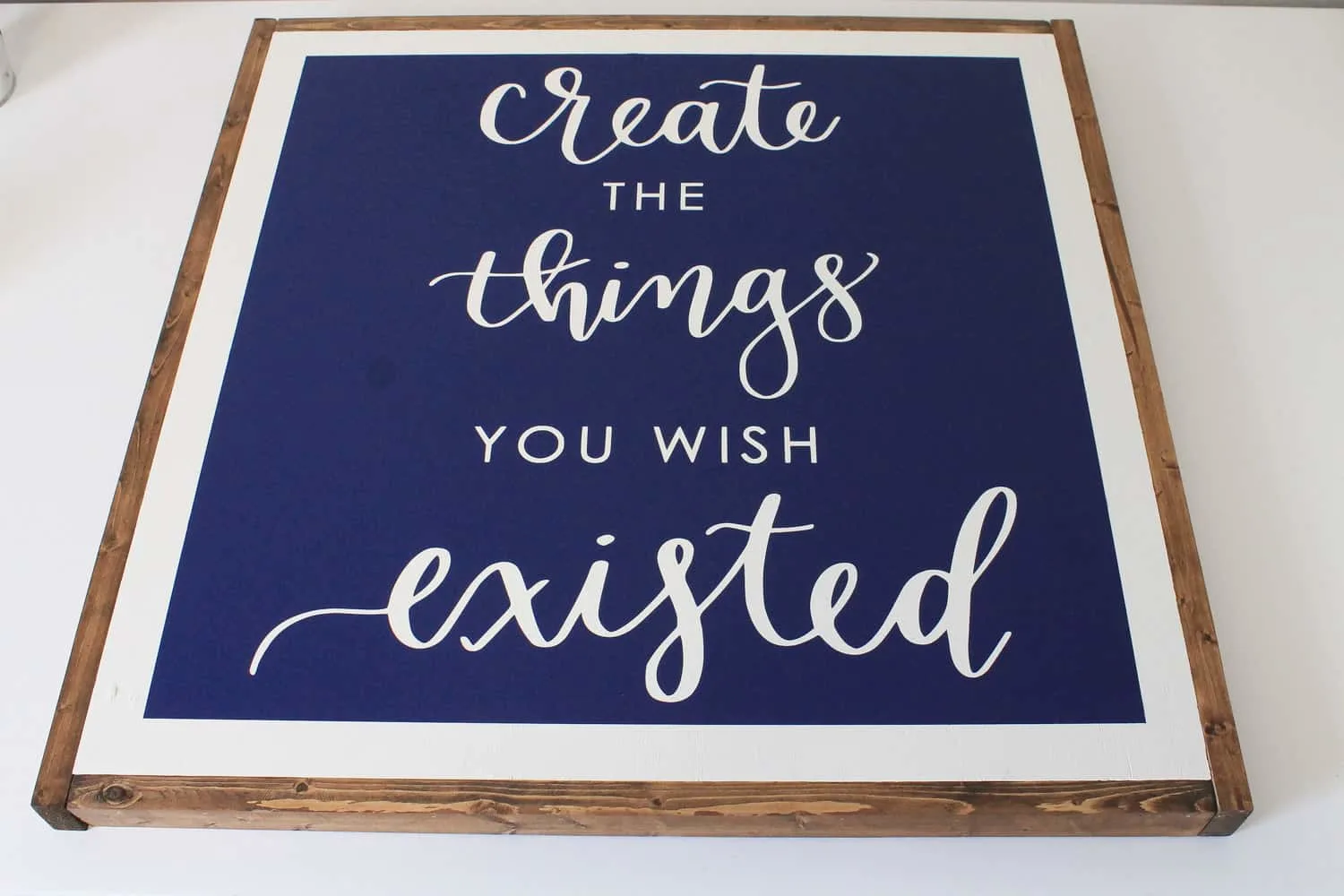

Most people don't have professional vinyl machines that can cut this large decal. So, I remade the sign recently with my Cricut and I'm explaining below step by step how to make the vinyl stencil in sections with the Cricut!
***
Materials Needed for Vinyl Stencils for Wood Signs Method:
- Create the Things SVG file (get the free file here)
- Cricut
- 12x24" cutting mats
- Vinyl (I use Oracal 631 matte vinyl)
- Vinyl weeding tool
- Transfer tape (I use Oratape HT55)
- Vinyl Application Squeegee
- Masking tape & Painter’s tape
- Craft razor blade cutter
I have the full step by step detailed tutorial on how to make this DIY wood sign with a Cricut in my video here! But, I will share below a summary of the steps as well for how to make stencils for wood signs!
A. Prepare the SVG file in Cricut Design Space
Check out my video tutorial to see a step by step of how to prepare the SVG file in Cricut Design Space so the design is split into 3 sections for cutting on 12x24" mats.
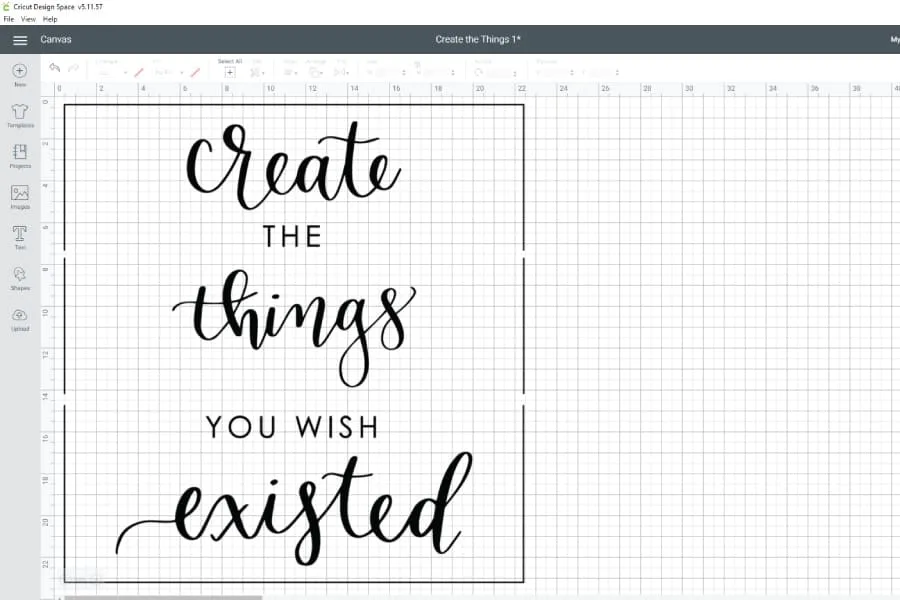
B. Cut the vinyl stencil with the Cricut
Cut the three sections of the design out on vinyl and the 12x24" cutting mats.
C. Weed the vinyl stencil
Remove each vinyl decal from the cutting mat.
Weed the vinyl using a vinyl weeding tool to help. Make sure to remove the lettering part and leave the surrounding vinyl, to make a vinyl stencil.
Make sure to keep the square box outline around your stencil on each of the three sections.
📩 Want to Save This?
D. Cut the edges of the square box outline
After weeding, cut the vinyl away right on the edge of each square box outline. This is so we can easily line up our square box outline for each vinyl section for a perfect fit on the sign backing board.

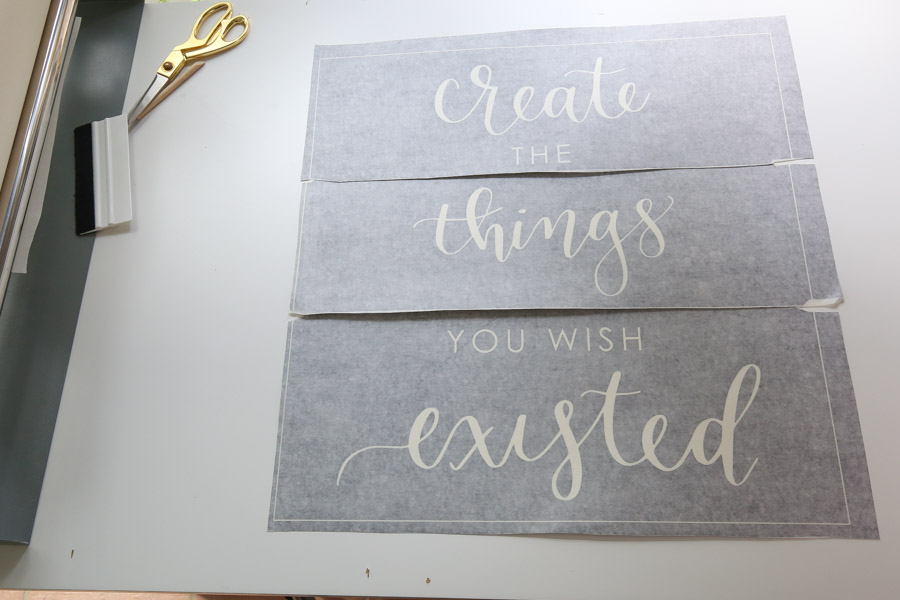
E. Apply transfer tape to the wood sign stencil
Next, apply transfer tape to your stencil. I like to use a transfer tape roller. It makes the process super easy especially for larger decals.
I start by taping the corners of the vinyl stencil down with masking tape. Then, I pull the transfer tape over the vinyl stencil and press the end of it down on the work surface and smooth it over the vinyl with a squeegee.
Cut the excess transfer tape off of the 3 vinyl stencil sections.

F. Apply the vinyl stencils to the sign one section at a time
Center the first vinyl stencil on the wood sign backing. Use a ruler and make sure it’s 1” from the square outline edge and the sign edge.

Apply the first section to the sign. See my video here for a detailed step by step on applying vinyl to wood signs. Also, I have the vinyl application details in this how to make a vinyl stencil tutorial (step #3).
Repeat these steps for the next two sections. Make sure to line each section up using the square outline edges and a 1” space between the sign board edges and square outline.
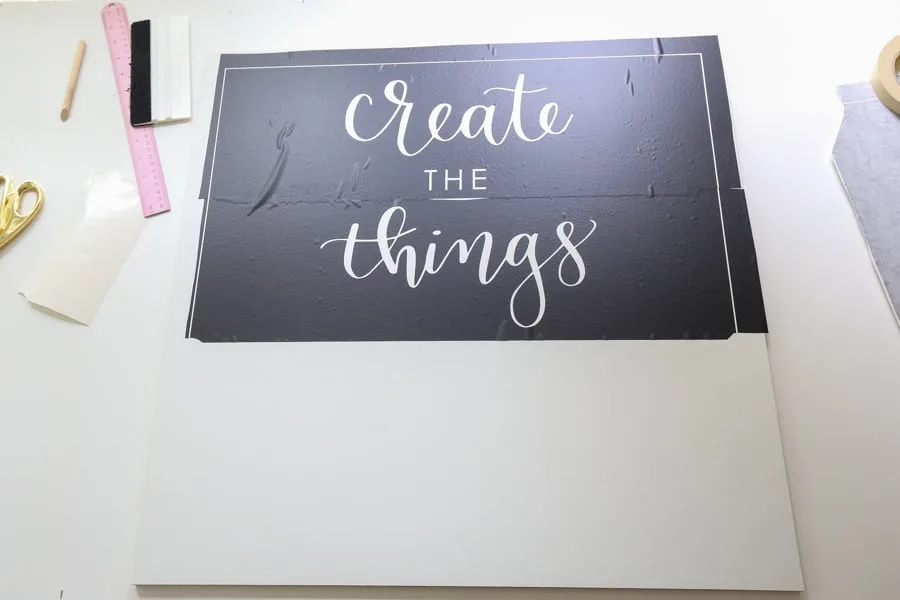
Also, it helps to remove a tiny bit of the transfer tape for lining the square up.


G. Tape off wood sign edges
Use painter’s tape and tape off the exposed edges and any open areas not covered by the vinyl.
H. Paint or spray paint over vinyl stencil
Finally, use either paint and a stencil brush or spray paint and paint over the vinyl stencil with multiple light coats. Light coats help to avoid bleed-through.
J. Remove the vinyl and tape
Remove the vinyl and tape! You will be left with your beautiful design transfer on the DIY wood sign! If any bleed-through occurred, you can do touch ups with a small paint brush!

***
Also, I just want to mention that if you are learning how to make wooden signs to sell, this transfer method is great for providing a beautiful, professional look! For more information, check out my tips on how to make wooden signs to sell.
5. Attach wood frame to DIY wood sign backing
Now it's time to attach the framing to the sign!
I like to place scrap 1x2s which are ¾” thick and a ¼” thick board under the sign so they line up perfectly with the 1x2 frame boards.
Use wood glue and a brad nailer with 1 ¼” brad nails and attach the frame boards to the sign. Start with the 25 ½” pieces along the sides and use clamps to keep them in place. Then add the 24” pieces on the top and bottom.

Make sure to wipe any excess wood glue away immediately with a damp paper towel.
You can use extra nails on the top since they won’t really show when hung on the wall.
Lastly fill the nail holes with wood filler and then stain.
Note, if you'd like more details and methods for framing, check out my post on how to frame wood signs.
Now your DIY wood sign is complete! Yay!!


I hope this tutorial on how to make a wooden sign with a saying has been helpful! Don't forget to check out my other DIY large wood sign tutorial too!
I will be sharing some more office projects in the upcoming weeks.
If you make this sign, please share it with me on social media @angelamariemade or #angelamariemade!
Be sure to follow along on Instagram and Facebook and YouTube for my latest projects, fun updates, and sneak peeks!
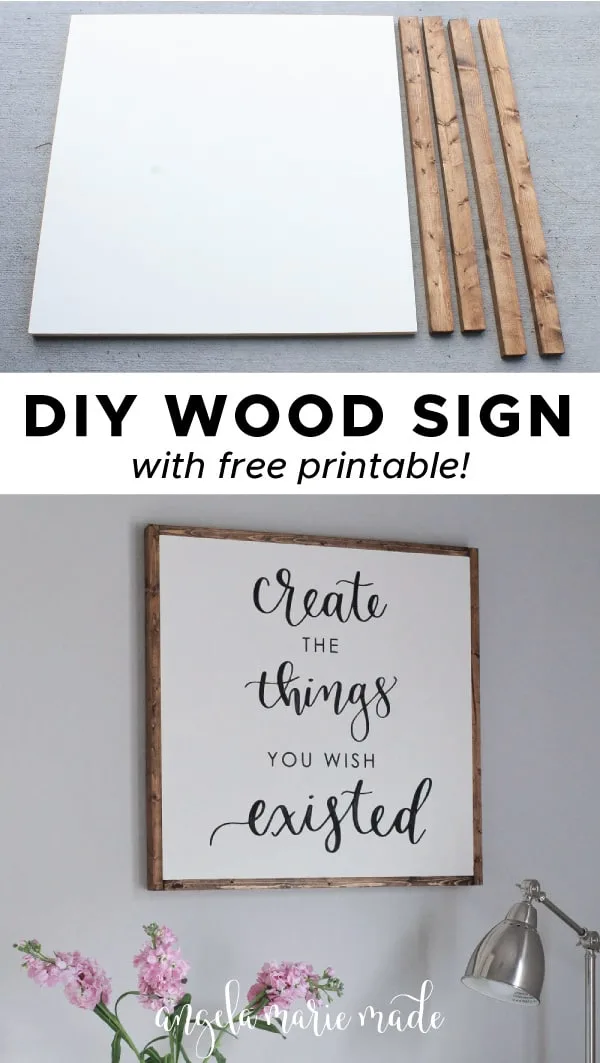
Want to save for later?! Pin it here:
More From the DIY Wood Sign Series:
- How to Make a Wood Sign with a Vinyl Stencil
- How to Easily Transfer a Design onto Wood
- How to Paint DIY Wood Signs
- 3 Ways How to Frame a DIY Wood Sign



What is the name of the calligraphy font used for this sign? Thanks for the great tutorial!
Hi Lacy, it's actually my hand lettering not a font! You're welcome for the tutorial!!
I've been trying to use your method for sign making and I'm having a hard time making sure the Brad nails go straight through, sometimes I'm off and they poke through. Is my board too thin? I used a 1/4 board and my frame is just a 1x2....any tips?
I should note that they're aren't poking through the back because they're too long, but sometimes they poke through kinda on the side but where the image is, it's very difficult to nail through 1/4 inch board. Is your board thicker?
Hi Lea, The board I used was 3/4 inch thick, I agree that the 1/4 inch thick is probably too thin. Maybe you could attach a 1/2 inch thick board to the back of your 1/4 inch board to make it thicker? Not sure if that would help or not...it may just be easiest to use the 3/4 inch board instead. Thanks!
I make signs the same way, but find that the oracle 631 sometimes leaves a sticky resedue, have you had this problem as well? What should I do?
Hi Haley! I haven't had that happen before with Oracal 631...maybe you could try a different brand of paint or waiting longer for the paint to cure before applying the vinyl to see if that helps? I know Oracal says to wait 1-2 weeks before applying vinyl after painting a surface so the paint is fully cured. Hope that helps!
Buy some felt sheets and stick them to it first and peel apart. You will still have enough adhesive but not as much residue
Thanks for the tip Misti!
I know I am a little late to this comment but thought if this gets back to Haley it might help her. When we make signs we use Stencil vinyl. Oracle does have one. This isn't the same kind of sticky so it peels up really easy and leaves no residue on the board and can be used once the paint or stain is dry to the touch. Sometime it will slightly peel the paint if it wasn't dry enough but it gives it a distressed feel. I hope that helps!
Thanks Anastasia! Do you know what the specific product is from Oracle? I'd love to test some out but they have quite a few different ones. Thanks!
The stencil vinyl from Oracle is actually called Oramask 813. Its amazing!!!! 🙂
Great, thank you! I will have to try it out!
How do you print out a vinyl decal that large? Did you split it into 2 pieces? I can't tell in the photo if you did...thanks for the tutorial!
I actually have a 24 inch vinyl cutter machine, so that's how I printed out one large decal. But, if I had used my silhouette cameo machine I would of created the decal in two 12 inch sections and then lined them up on the sign to create the full size design.
How did you decide to hang the photo on the wall? Beautiful project by the way!
Thanks Sydney! I hung it from the back wood ledge of the sign on some screws that were screwed into the wall studs.
Hey! I was wondering where the desk from this wood frame diy was from. It's beautiful and perfect for my room and I would love to buy it!
Hi Sanah! The desk is from Wayfair and I actually painted it white since it didn't come in white originally. I wrote a post on how I painted it and share a link to the desk as well here: https://angelamariemade.com/2016/05/desk-makeover/
Hi there,
When using the vinyl as a stencil, how do you ensure the centres of letters (e, o, g, a...) remain in the right place? Do you place them yourself by eye?
Thanks,
Ashley
Hi Ashley, The vinyl is applied with transfer tape, so the entire vinyl decal stencil gets transferred to the sign as one piece. I have a more in-depth vinyl application tutorial that shows this process under the how to make decals section of this post: https://angelamariemade.com/2017/02/how-to-make-pantry-label-decals-and-stickers/
Is the white part just a board painted? ? I love this
Thanks Connie! Yes, it's a 2ft x 2ft plywood board painted white.
Hello! What are the fonts you used for this project? I absolutely love this and can think of a few signs I would love to diy. Thanks for sharing!
Thanks Heather! It's actually my own hand lettering, not a font!
What about your title on the website 'Angela Marie Made'... what is that font?
That's my own calligraphy that I digitized
What color is the stain for the wood frame? Also how do I make my own phrase to print out as an engineering print at Staples This is my first time making a framed wood sign, and I am hoping to make one for my daughter's room. Thank you so much!
I'm pretty sure I used Minwax Provincial for the frame, which can be found here: http://amzn.to/2stcsek For making your own phrase, you can create the design first with a calligraphy or script font. I use Adobe Illustrator for creating my designs, but if you don't have that, Microsoft Word would work, but you need to change the paper size to your sign size. Then after you create the design, save the file as a PDF which is a good file type for Staples engineering prints. I'm actually planning on doing a blog post soon with a more in depth tutorial on how to make your own phrase/design and I'm going to include an editable PDF template that is already at the correct size. Stay tuned!
Thank you so much! We are decorating my daughter's room starting on Monday to finally give her a girl's room. Painting her walls, I've been painting an old dresser and desk, and more! So I hope the blog will be in time! I only have Wordpad on the computer so no fancy software. Quick question though..if I find a free printable quote (any size) can I just send it to Staples asking for the larger size print, and have it look right? Trying to find the perfect quote for her princess room! Thank you again!
You're Welcome! That sounds so exciting about updating your daughter's room! I plan on doing the post in the next few weeks. And with the editable template I'm going to provide, you just need the free version of Adobe Acrobat Reader, which can be download for free online. If you find a free printable quote, you can send it it Staples and have them enlarge it, but you want to make sure it has a high resolution or when the file gets enlarged it may become pixelated or blurry. Hope that helps!
Thank you so much for the help! I am not fully sure how to make sure it is high resolution, but it helps to know I can use one. My handwriting is horrible so I won't even attempt to try to make a sign freehand! LOL Thank you again for the help!
Hi Melissa! I'm not going to be able to do the post with the template anymore, it didn't work out the way I wanted it too. So, I hope you were able to find a printable that works!
I haven't yet, but it's alright. Thank you so much for taking the time to let me know, and for remembering me!
What vinyl cutter were you using for this tutorial?
I have a 24 inch Graphtec vinyl cutter that I used. But you can also do it with a craft size cutter like the Cricut or Silhouette Cameo, and create the decal in two 12 inch sections and then line them up on the sign to create the full size design.
What kind of font do you use?
It's actually my own hand lettering that I digitized
This is the best tutorial, thank you!
I just love your blog, thank you for posting such awesome ideas and responding to everyone so kindly! I have been wanting a vinyl cutter for years but wanted to make sure I could justify the cost. I am wondering what the process is to design your quote. Can you do that through the vinyl cutter or do you have to have another application like illustrator to design? Thank you in advance for your time!! 🙂 Haley
Thank you Haley, that is so sweet!! You can do quote designs within the vinyl machine software. So, for a silhouette cameo, the software is called Silhouette Studio which comes with the machine when you buy it. You can also import any JPG design or graphic into Silhouette studio and turn it into a cut file by tracing it. I show how to do that in this post: https://angelamariemade.com/2018/01/how-to-make-a-diy-wood-sign-with-vinyl-stencil/
For the "Create the things you wish existed design" in this post, I designed it in Illustrator because the calligraphy part is my own hand lettering that I digitized and vectorized in Illustrator, which is my preferred design program to use. Then, I brought the JPG file of it into the vinyl machine software. Hope that all makes sense!
I have tried clicking on the link to see the wood planks you use but the link is not working 🙁 Let me know because I bought the stain and I think boards you used look gorgeous!
Thanks!
Thanks for letting me know Bethany! Here is the link to the plywood board: https://www.homedepot.com/p/Columbia-Forest-Products-1-2-in-x-2-ft-x-2-ft-PureBond-Maple-Plywood-Project-Panel-Free-Custom-Cut-Available-2663/204771043
And the 1x2s were from Lowes!
Hi! I'm new to making signs and have been using Oracal 631 and 651 to apply straight to the sign (as opposed to creating a stencil. Have you ever used this method? I'm worried about the letters peeling with time but haven't been able to find any info on whether this will be an issue or not. Thanks so much! Your sign is beyond gorgeous.
Thanks!! Yes I have used just Oracal vinyl before on signs for the lettering/designs. For those signs that I made a few years ago with just the vinyl, I haven't had any peeling issues. Since you're using Oracal, which is a high quality vinyl, it can last several years or longer for indoor signs. I think the oracal 651 (which has outdoor durability) can last much longer, so you may want to use that for extra long term durability. The letters may peel over time, but I'm not sure how many years it would take, and I would think that it also depends on humidity levels and other environmental factors. But I don't think it's anything you need to worry about happening right away unless the vinyl had initial issues with sticking to the surface.
I saw a very similar sign the other day in the ultrasound dept of my hospital. I have been so sick, and when I saw that sign I didn't have my phone with me. I had the nurse write the quote down for me because I love that quote, and I didn't want to forget what it said. The nurses didn't know who made it or where it came from.
Who ever made it used the bead board paneling and painted it white and made the frame like yours. It had the same calligraphy and lettering, so they must have it got it from you!
I am thrilled that you have posted this!
Thanks so much for letting me know Angela! I love hearing about others who have made the sign and I'm glad to hear it's in a good place!!
Hi can you please tell me the brand name of the 24 in vinyl cutter you used? I was thinking about purchasing the US CUTTER which is 34in. Any advice would be greatly appreciated!!!
It was the Graphtec ce6000-60. It worked great and I never had any issues with it. It is definitely an investment though, so I would recommend it if it's something you are going to use often. Another brand that I've heard great things about is the Roland. I don't know much about the US Cutter brand as far as performance goes.
Thank you so much for getting back to me!! <3 Jill